

Review the following sections to ensure that you meet the system requirements for the ZENworks Synergy software components, and to understand the various configurations you can use.
Your environment needs to meet the following general software requirements. For more detailed requirements for a product, see the product's documentation at the Novell Documentation site.
1 Novell Application Launcher and the Novell Client are required only if you want users to launch desktop applications from Novell Application Launcher instead of (or in addition to) their Web browsers.
2 The DeFrame client is required only if you want users to launch thin-client applications from Novell Application Launcher instead of (or in addition to) their Web browsers. The DeFrame client requires Novell Application Launcher and the Novell Client to be installed.
The ZENworks Synergy environment consists of many software components, as explained in System Requirements above and illustrated in the following diagram.
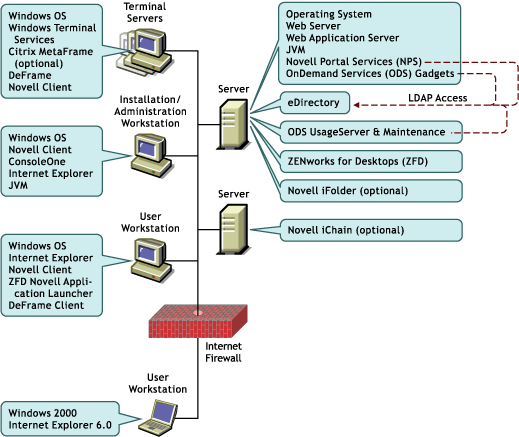
All software components included in an individual shaded box must be installed on the same machine, but software components in different boxes can be installed on different machines. The following sections illustrate some of the configurations you could use:
In the single-server configuration shown below, all server software components are installed on a single NetWare 6 server. This configuration saves on hardware but may sacrifice performance. Users will be accessing NPS and the OnDemand Services (ODS) gadgets through the Web server; at the same time, ZfD and the ODS UsageServer and Maintenance processes will be running on the server.
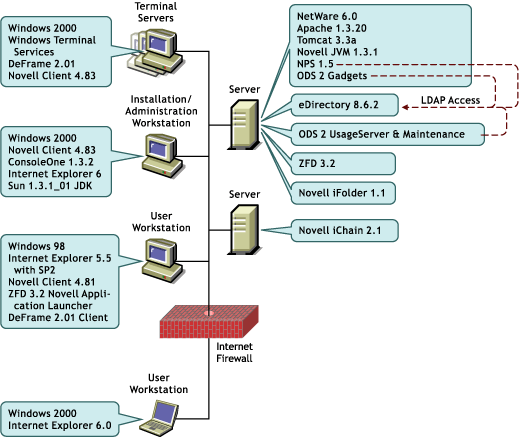
The terminal servers are running Windows Terminal Services only (no Citrix MetaFrame), and users' workstations have Microsoft Internet Explorer, the Novell Client, Novell Application Launcher, and the DeFrame Client installed. Internet Explorer enables users to launch all applications (desktop, thin-client, and Web) from a Web browser. The Novell Client, Novell Application Launcher, and the DeFrame Client enable users to launch desktop and thin-client applications from Novell Application Launcher.
Novell iFolder, an optional add-on component, is installed on the NetWare 6 server. Novell iFolder enables users to store files on a network location and retrieve them from any location. When users are running a thin-client application, it provides them with the ability to save thin-client applications to a location other than the application's terminal server.
Novell iChain, another optional add-on component, is installed on another server. Novell iChain manages access to Web server content (including Web applications) from both inside and outside the firewall.
This configuration uses two servers: one for the portal server and one for the ZfD server. This server configuration has an advantage over a single server configuration in that the workload generated by the portal and ZfD is shared between two servers.
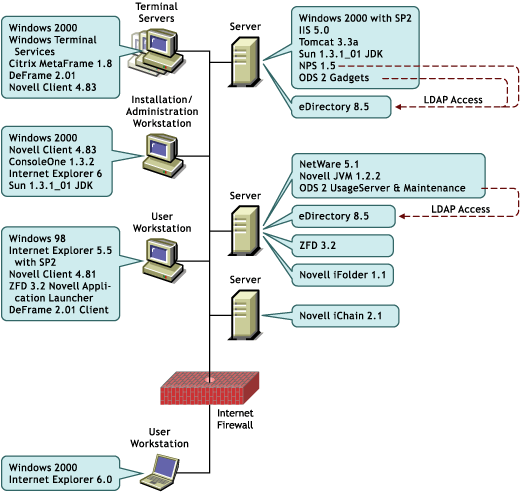
The portal server is running NPS and the ODS gadgets while the ZfD server is running ZfD and the ODS UsageServer and Maintenance processes. Both servers have the same version of Novell eDirectory installed, and all NPS, ZfD, and OnDemand Services information is configured and stored in the same eDirectory tree.
The terminal servers are running Windows Terminal Services and Citrix MetaFrame so that both the Remote Desktop Protocol (RDP) and the Independent Computer Architecture (ICA) protocol are available.
As in Sample Configuration 1, both Novell iChain and Novell iFolder have been added to enhance security and file storage capabilities.
This configuration uses three servers: a portal server, a ZfD server, and an ODS server. This server configuration further distributes the workload generated by the portal, ZfD, and the ODS UsageServer and Maintenance processes.
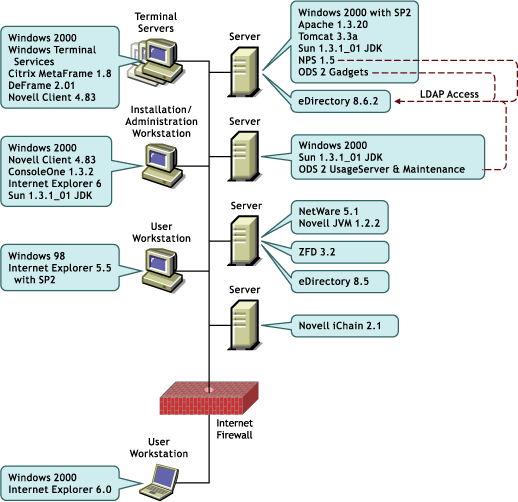
The portal server is running NPS and the OnDemand Services gadgets. The ZfD server is running ZfD. The ODS server is running the ODS UsageServer and Maintenance processes. Novell eDirectory is installed only on the ZfD server, but NPS and the ODS UsageServer and Maintenance processes have LDAP access to eDirectory on that server.
As in Sample Configuration 2, the terminal servers are running Windows Terminal Services and Citrix MetaFrame so that both the RDP protocol and the ICA protocol are available. In addition, both Novell iChain and Novell iFolder have been added to enhance security and file storage capabilities.